How to Use Claude AI: From First Prompt to Managing an AI Dev Team
By Kurt Wuckert Jr.
By Kurt Wuckert Jr. | March 2026
Affiliate Disclosure: This article contains links which may benefit Kurt Wuckert Jr
My developers used to write code. Now they manage dozens of employees who write code for them...
The employees just happen to be AI agents powered by Claude.
In 2024, the development team at bOpen.io went from being hands-on-keyboard coders to senior development managers. It was a slow transition at first, led by Luke Rohenaz, but by the end of 2025, our output had improved by over 100X as the entire team had transitioned to an "AI First" workflow.
Shoutout to David Case, Dan Wagner, Michael "Root" Boyd and Jason Chavannes for having the bravery to go down this path!
Today, each of them now oversees a fleet of specialized AI agents that handle what used to bottleneck on human availability: building features, running tests, auditing security, writing documentation, managing deployments. The humans set direction, review output, and make architectural decisions. The agents do the building.
In 90 days, we shipped more production software than we had in the previous two years. Authentication systems, blockchain integrations, content management pipelines, social networks, and a full agent team that handles tasks across the entire development lifecycle. All built in conversation with Claude.
If you have never touched AI tooling, this article is for you. If you are a developer who has been curious about Claude Code but has not pulled the trigger, this is also for you. I am going to walk you through exactly how I set this up, from creating an account to deploying AI agents that do real work. Every step. Code snippets and terminal examples included.
And if you want to try Claude right now, use my gift link: Get Claude here. It gives you a head start.
This article is a companion piece to this walk-through on YouTube which aired on Tuesday, March 18th, 2026.
Watch the episode here!
Part 1: For Everyone (No Coding Required)
What is Claude, and why should you care?
Claude is an AI built by Anthropic. You have probably heard of ChatGPT. Claude is built by a different company with a different philosophy, and in my experience, it produces dramatically better results for anything involving reasoning, writing, and code.
There are three ways to use Claude:
Claude.ai (the web interface): Chat with Claude in your browser, upload files, analyze documents, generate content. This is where everyone starts.
Claude Code (the terminal tool): Claude lives inside your terminal, reads your codebase, writes real code on your machine, runs tests, and commits changes. This is where developers live.
Claude API (for builders): Integrate Claude directly into your applications. Power users and product teams use this.
This guide covers the first two. By the end, you will understand how to go from "I have never used AI" to "I have an AI development team."
Step 1: Create your Claude account
Go to claude.ai/referral/EkwGoE2TFA and create an account. You can sign up with Google, Apple, or email.
The free plan gives you access to Claude for general conversation, document analysis, and content generation. That is enough to get your feet wet and understand what Claude can do.
Once you are in, you will see a clean chat interface. Type a question. Any question.
"Explain the Federal Reserve to me like I am 15."
"Write a meal plan for someone doing intermittent fasting."
"Help me draft an email to my landlord about a maintenance issue."
"Summarize this 40-page PDF and pull out the three most important findings."
Claude handles all of it, and it does it well.
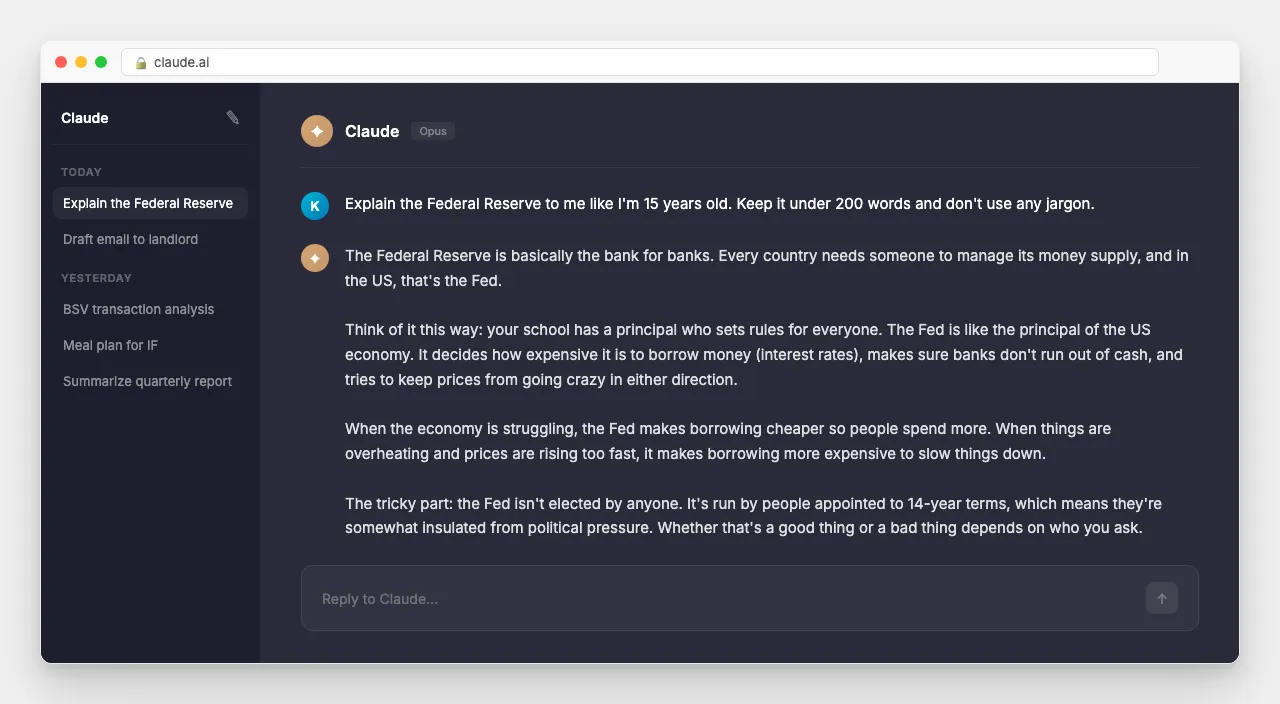
My recommendation: Start with the free plan. Use it for a week. Ask Claude to help you with something you are actually working on. Not toy examples. Draft a real email. Analyze a real document. Summarize a real meeting. You will know within a few days whether this tool belongs in your workflow.
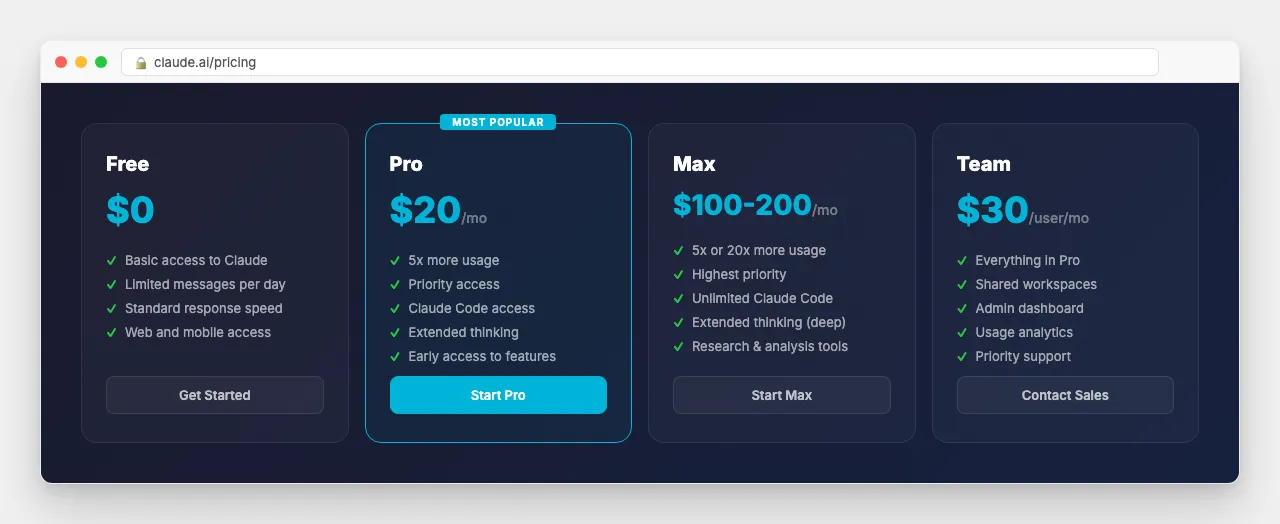
Step 2: Upgrade to Pro (when you are ready)
The free plan has limits. When you hit them, you wait. If you are using Claude for real work, the wait kills your momentum.
I run the $200 Max plan because I use Claude Code for 8-12 hours a day and I need extended thinking for complex architecture decisions. If you are a developer shipping production code daily, Max pays for itself in the first week.
For everyone else: Pro at $20/month is the sweet spot. If Claude saves you one hour per day (it saves me closer to six), Pro pays for itself before your first cup of coffee. A gym membership costs more and most people never use it.
Step 3: Learn how to talk to Claude
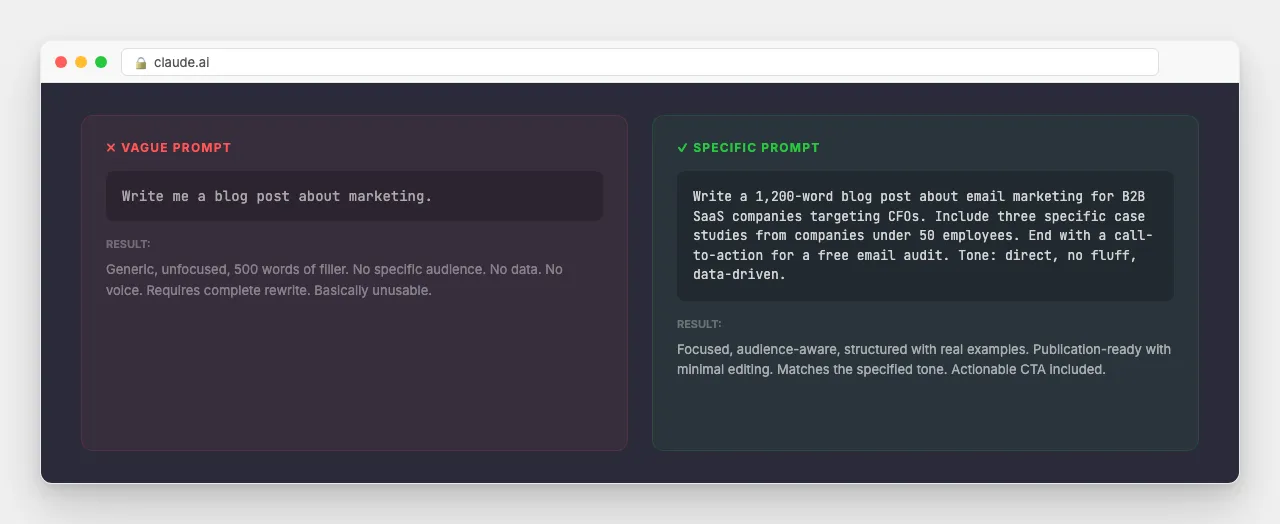
Most people underuse AI because they give it terrible prompts. The difference between a useless response and a brilliant one is almost always the quality of the input.
Bad prompt:
Write me a blog post about marketing.Good prompt:
Write a 1,200-word blog post about email marketing for
B2B SaaS companies targeting CFOs. Include three specific
case studies from companies under 50 employees. End with
a call-to-action for a free email audit. Tone: direct,
no fluff, data-driven.
The second prompt produces something you can actually publish with minimal editing.
Three principles that changed my results:
1. Be specific about what you want. Include the format, length, audience, and tone. Claude does not read your mind, but it follows instructions precisely.
2. Give it context. Upload the document you are working on. Paste the email thread you are responding to. Share the data you are analyzing. Claude works best when it has the same information you do.
3. Iterate, do not start over. Your conversation with Claude is a working session, not a one-shot query. If the first response is not right, tell Claude what to change. "Make the tone more direct." "Cut the second paragraph." "Add specific numbers from Q4." It adjusts in real time.
Here is a real example from my workflow. Instead of asking Claude to "write a tweet about Bitcoin," I say:
Write a tweet responding to this claim: "Bitcoin can't
scale without Layer 2."

My position: Bitcoin (BSV) already processes 150M+
transactions per day on-chain with sub-cent fees. BTC
chose not to scale. That was not a technical limitation.

Keep it under 280 characters. Confrontational but factual.
No insults.
That produces a tweet I can post immediately with minimal editing. The specificity is what makes it work.
Part 2: For Developers (and the Developer-Curious)
Step 4: Install Claude Code
This is where it gets serious. Claude Code is not a chatbot with a code theme. It is an AI software engineer that lives in your terminal, has full access to your filesystem, understands your project structure, and executes real commands on your machine.
Requirements:
macOS, Linux, or Windows 11 (WSL2)
A Claude Pro, Max, or Teams account
A terminal (iTerm2, Terminal.app, Windows Terminal, etc.)
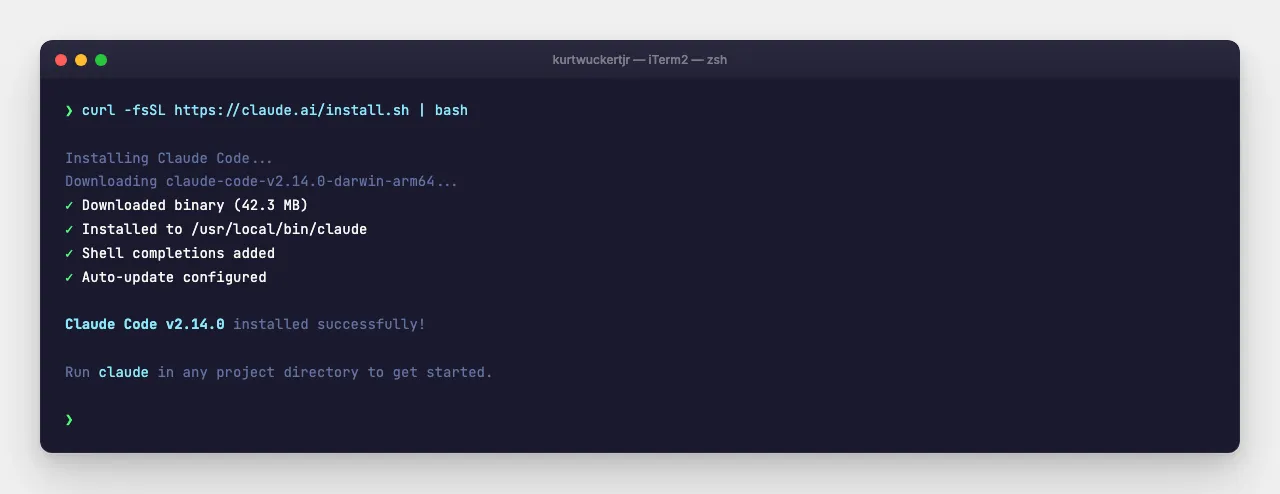
Terminal Installation (one command):
curl -fsSL https://claude.ai/install.sh | bashThat is it. No Node.js required. No dependency hell. It installs the native binary and auto-updates.
First run:
Open your terminal, navigate to any project directory, and type:
claudeYour browser opens for a one-time authentication. Sign in, return to your terminal, and you are connected. Claude now has context about your project.
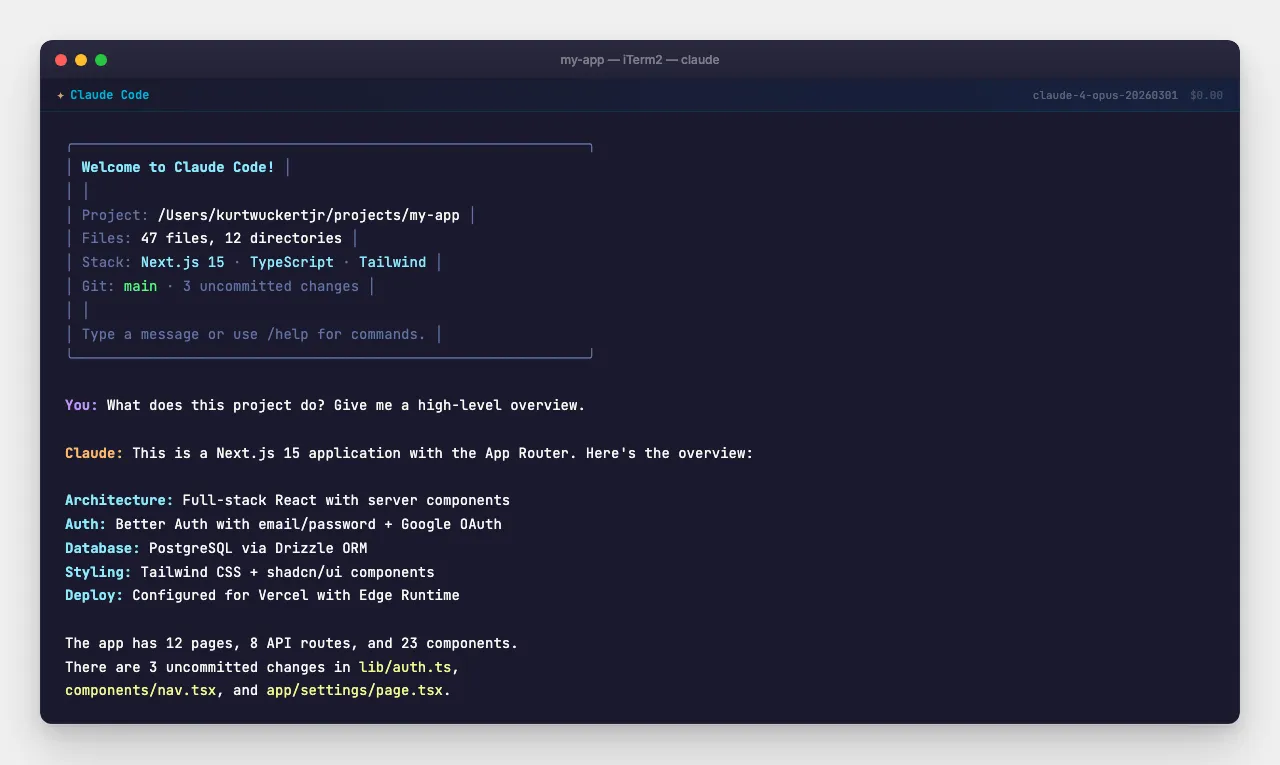
Your first conversation with Claude Code:
Navigate to a project directory (or create one) and start talking:
mkdir ~/my-first-project && cd ~/my-first-project
claude
Now type naturally:
Create a new Next.js app with TypeScript and Tailwind CSS.
Add a landing page with a hero section and a feature grid.
Dark mode by default.
Claude will:
Initialize the project with
bunx create-next-appConfigure Tailwind and TypeScript
Build the components
Run the dev server to verify everything works
Watch it work. It reads files, writes code across multiple files, installs dependencies, and checks its own output. This is not autocomplete. This is an engineer.
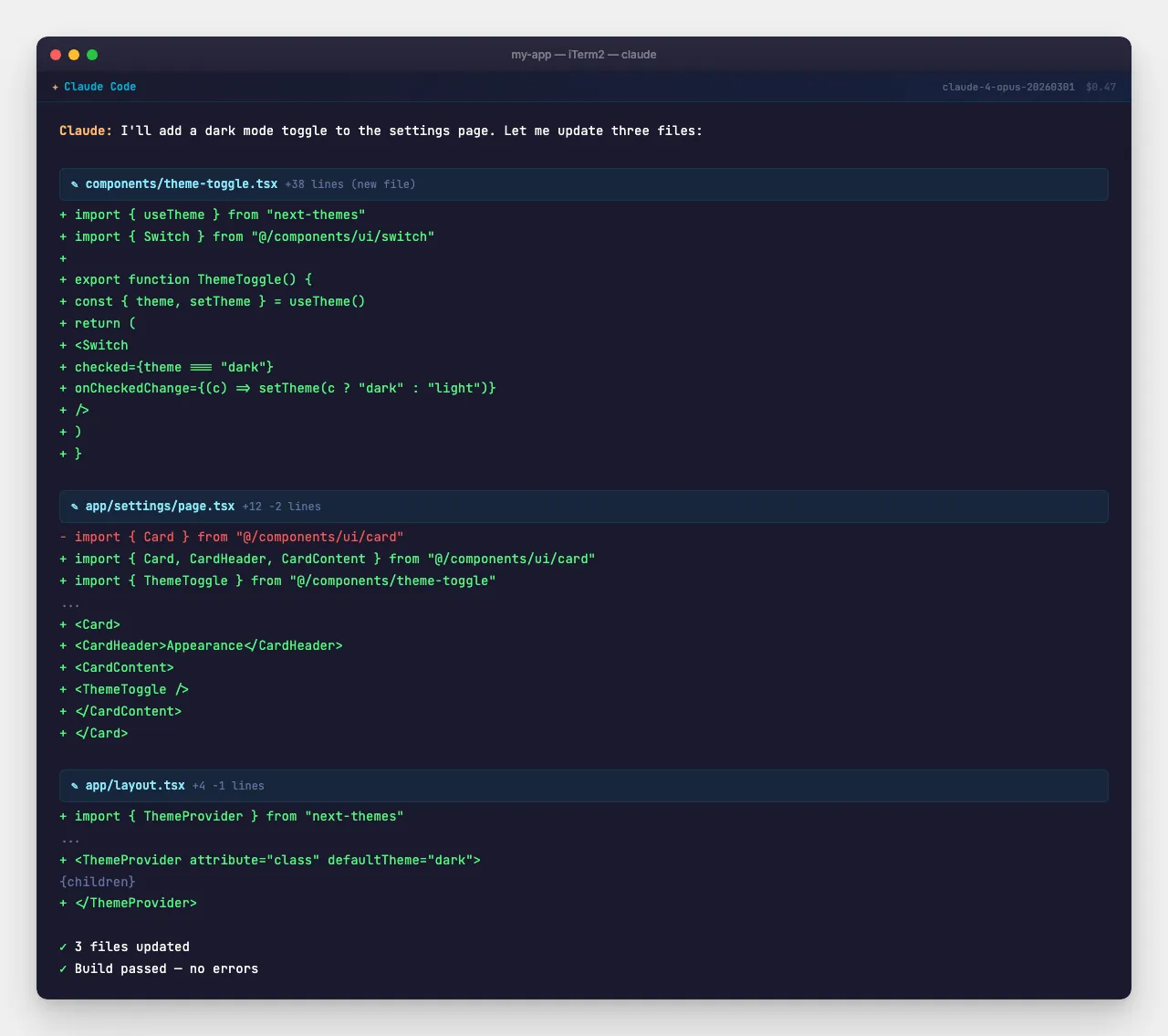
Step 5: Essential Claude Code commands
Once Claude Code is running, these are the commands and patterns you will use every day:
Slash commands:
/plan          # Enter Plan Mode; Claude outlines the approach
               # before writing any code. Use this for anything
               # that touches more than two files.

/compact       # Compress conversation context when it gets long.
               # Keeps Claude focused without losing project knowledge.

/clear         # Start fresh. Useful when switching tasks.

/cost          # See how much this session has cost in API usage.
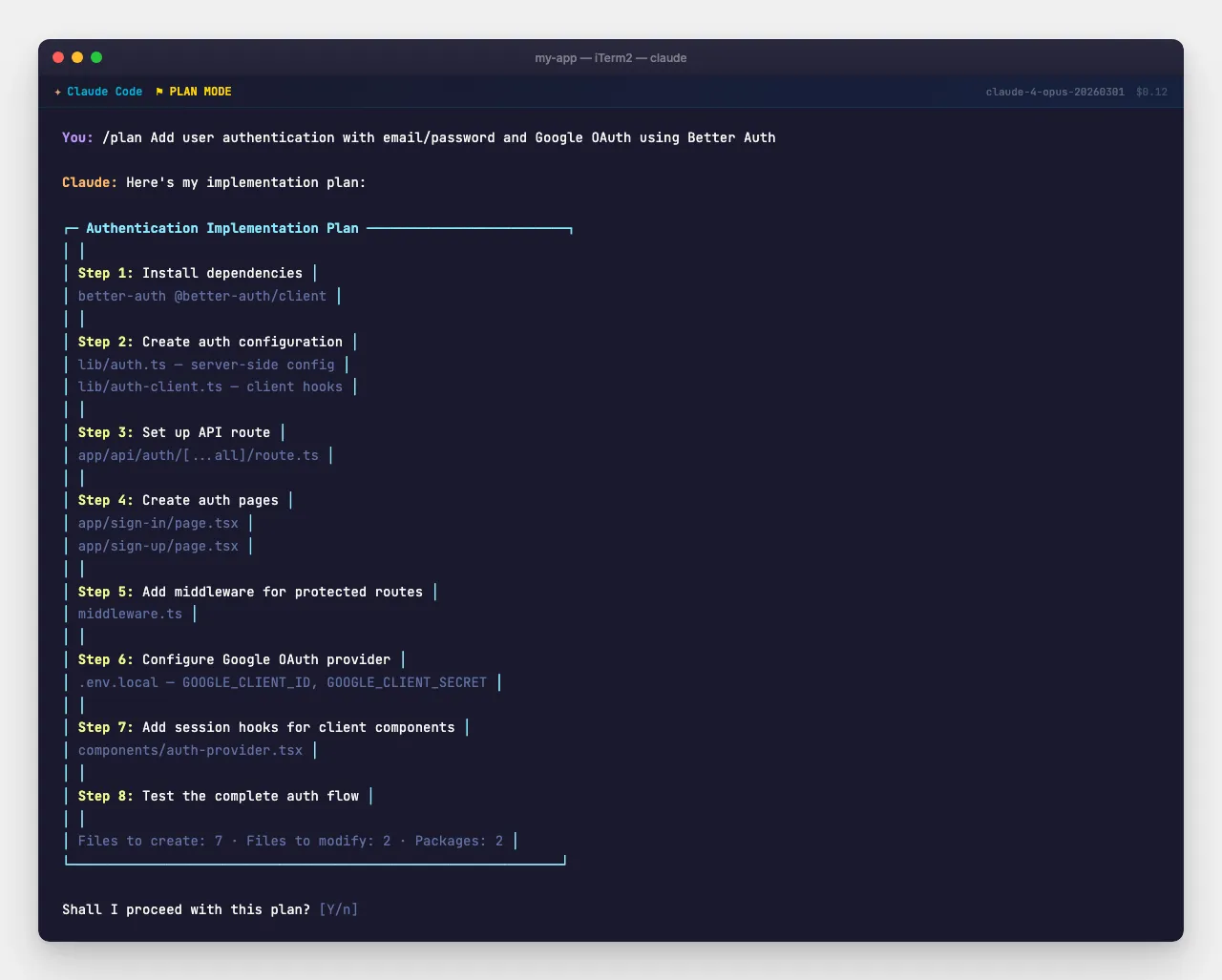
Plan Mode example:
/plan Add user authentication with email/password and
Google OAuth using Better Auth. Include protected routes
and a session management system.
Claude produces a structured plan:
Plan:
1. Install better-auth and dependencies
2. Create auth schema in lib/auth.ts
3. Set up API route at app/api/auth/[...all]/route.ts
4. Create sign-in and sign-up pages
5. Add middleware for protected routes
6. Configure Google OAuth provider
7. Add session hooks for client components
8. Test the complete auth flow

Shall I proceed?
Review it. Approve it. Claude builds it.
Permission system:
Claude asks before running commands, editing files, or executing scripts. You control what it can do automatically and what requires your approval.
# In your project's .claude/settings.json:
{
  "permissions": {
    "allow": [
      "Bash(bun:*)",
      "Bash(git:*)",
      "Read",
      "Write",
      "Edit"
    ]
  }
}
Start conservative. As you build trust, expand permissions for common operations.
Step 6: Understand Agents, Skills, and MCPs
This is where Claude stops being a tool and starts being a team.
Skills are reusable instruction sets that teach Claude how to perform specific tasks. They load automatically when relevant. Think of them as expertise modules.
# Example: When you type /commit, the commit skill activates
# and Claude writes a conventional commit message based on
# your staged changes, following your team's conventions.

/commit
# Output:
# feat(auth): add Google OAuth provider with session management
#
# - Configure better-auth with Google OAuth credentials
# - Add protected route middleware
# - Create sign-in/sign-up page components
# - Wire up session hooks for client-side auth state
#
# Co-Authored-By: Claude <noreply@anthropic.com>
Agents are specialized sub-processes that handle complex, multi-step tasks autonomously. Instead of Claude doing everything in one conversation, it spins up dedicated agents that work in parallel.
# When you ask Claude to build a feature, it can dispatch:
#
# ┌─────────────┐   ┌──────────────┐   ┌────────────┐
# │  Researcher  │   │   Designer   │   │   Tester   │
# │  (explores   │   │  (builds UI  │   │  (writes   │
# │   patterns)  │   │  components) │   │   tests)   │
# └──────┬──────┘   └──────┬───────┘   └─────┬──────┘
#        │                 │                  │
#        └────────────┬────┘──────────────────┘
#                     ▼
#            ┌────────────────┐
#            │  Main Claude   │
#            │  (integrates   │
#            │   all results) │
#            └────────────────┘
MCPs (Model Context Protocol servers) connect Claude to external tools and data sources. GitHub, databases, Vercel, your browser, design tools, scheduled tasks. MCPs turn Claude from an isolated AI into a connected system.
# Example: Claude Preview MCP lets Claude open and interact
# with your running web app in a real browser:

claude> Check the landing page for layout issues on mobile

# Claude launches a headless browser, navigates to localhost:3000,
# resizes to mobile viewport, takes a screenshot, identifies
# issues, and fixes them all autonomously.
Step 7: Install bOpen plugins (this is where it gets wild)
Here is where my setup diverges from default Claude Code. bOpen.ai builds professional-grade plugins that add 28+ specialized agents, 48+ skills, and integrated MCP servers to your Claude Code environment.
Install the bOpen tools plugin:
claude /install-plugin bopen-tools@bopen-ioThis single command gives you access to a full development team:
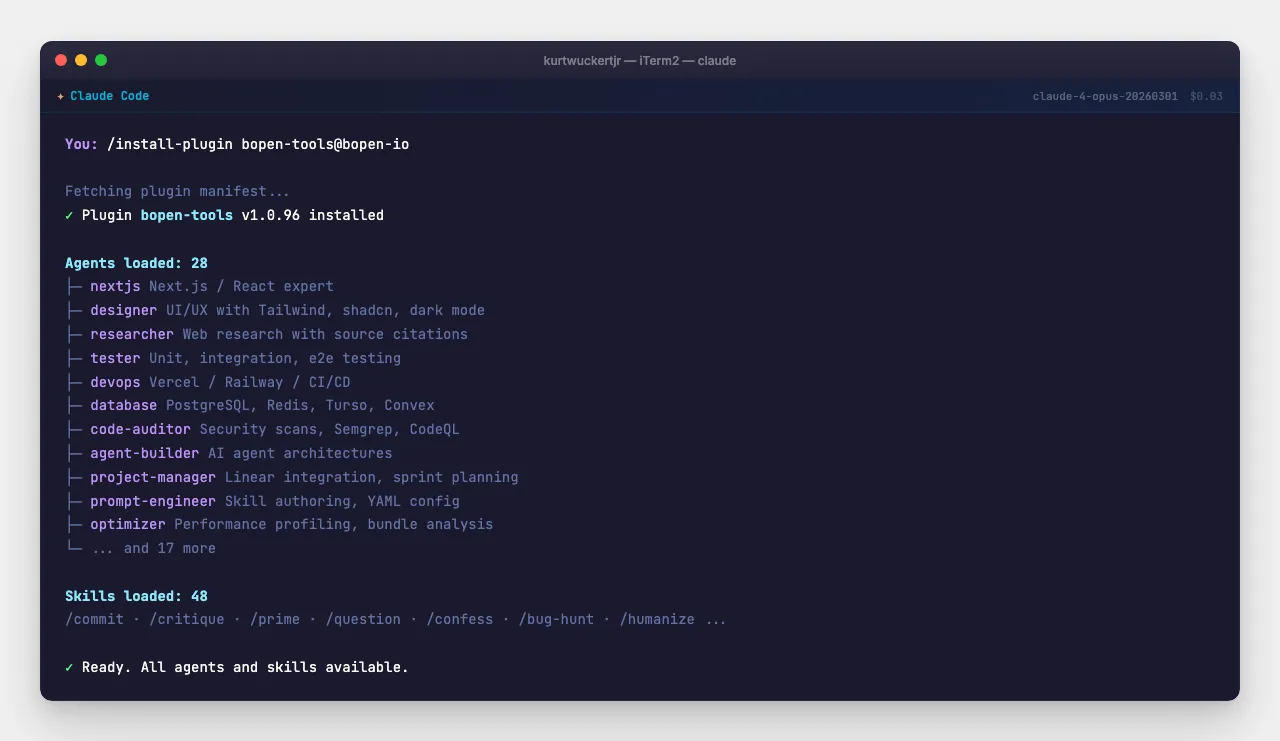
Agents (the team):
| `nextjs` | Expert Next.js/React dev with Vercel best practices | Every frontend feature |
| `designer` | UI/UX with Tailwind, shadcn, dark mode, accessibility | Landing pages, component libs |
| `researcher` | Web research, X/Twitter analysis, source citations | Articles, competitive analysis |
| `tester` | Unit, integration, e2e testing with Playwright | Before every merge |
| `devops` | Vercel/Railway deploys, CI/CD, monitoring | Shipping to production |
| `database` | Schema design, query tuning, migrations | PostgreSQL, Redis, Turso |
| `code-auditor` | Security audits, Semgrep, CodeQL scanning | Before launches |
| `agent-builder` | Design and deploy AI agent architectures | Building new workflows |
| `documentation-writer` | READMEs, API docs, technical guides | Every public-facing project |
| `project-manager` | Linear integration, tickets, sprint planning | Weekly planning |
| `prompt-engineer` | Skill authoring, YAML config, Claude settings | Customizing Claude behavior |
| `architecture-reviewer` | System design, dependency mapping, refactoring | Big architectural decisions |
Skills (the daily drivers):
/commit           # Conventional commits from staged changes
/critique         # Review your diff before pushing
/prime            # Warm up context: git state, project info, conventions
/question         # Read-only Q&A: ask about your codebase without changing it
/simplify         # Review changed code for reuse and quality
/confess          # Self-audit: Claude checks its own work for mistakes
/bug-hunt         # Adversarial 3-agent audit (Hunter/Skeptic/Referee)
Specialized skills for content and media:
/generate-image   # AI image generation via Gemini
/generate-video   # Video generation via Veo
/generate-svg     # Vector graphics and logos
/deck-creator     # Presentation slide decks
/humanize         # Strip AI patterns from writing
/geo-optimizer    # Audit content for AI search visibility
Real example from my workflow:
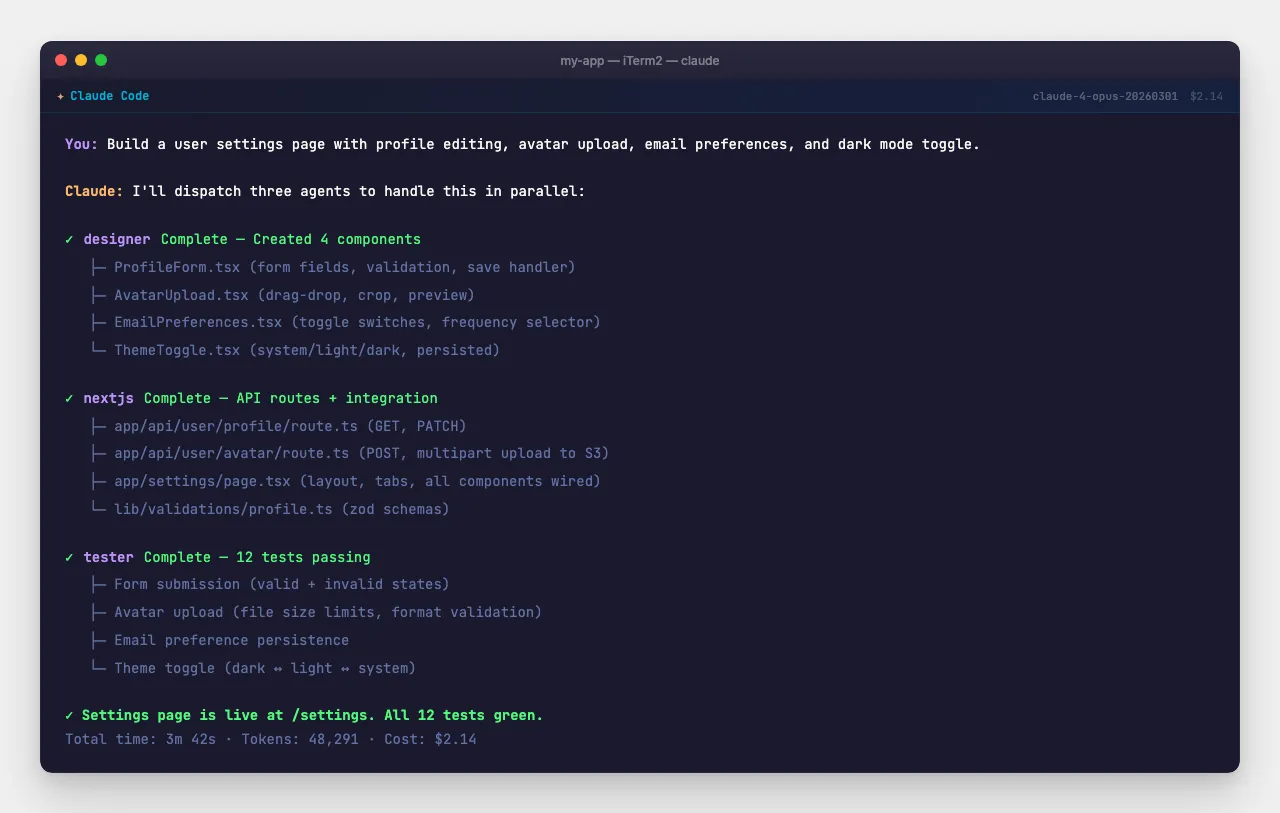
Here is what building a feature looks like with bOpen agents:
me: Build a user settings page with profile editing,
    avatar upload, email preferences, and dark mode toggle.
    Use the existing auth system and match the current
    design language.

Claude: I'll use the designer agent for UI, the nextjs
        agent for the implementation, and the tester agent
        to verify everything works.

[Designer agent]: Created 4 components, ProfileForm,
                  AvatarUpload, EmailPreferences, ThemeToggle
[NextJS agent]: Wired up API routes, form validation,
                image upload to S3
[Tester agent]: 12 tests passing, form submission,
                validation errors, avatar crop, theme persistence

Settings page is live at /settings. All tests green.
That entire feature, from nothing to tested and deployed, took about 15 minutes. A human team would spend a day or two on the same scope.
Step 8: Build your first real project
Enough theory. Build something.
mkdir ~/my-claude-project && cd ~/my-claude-project
claude
Type this:
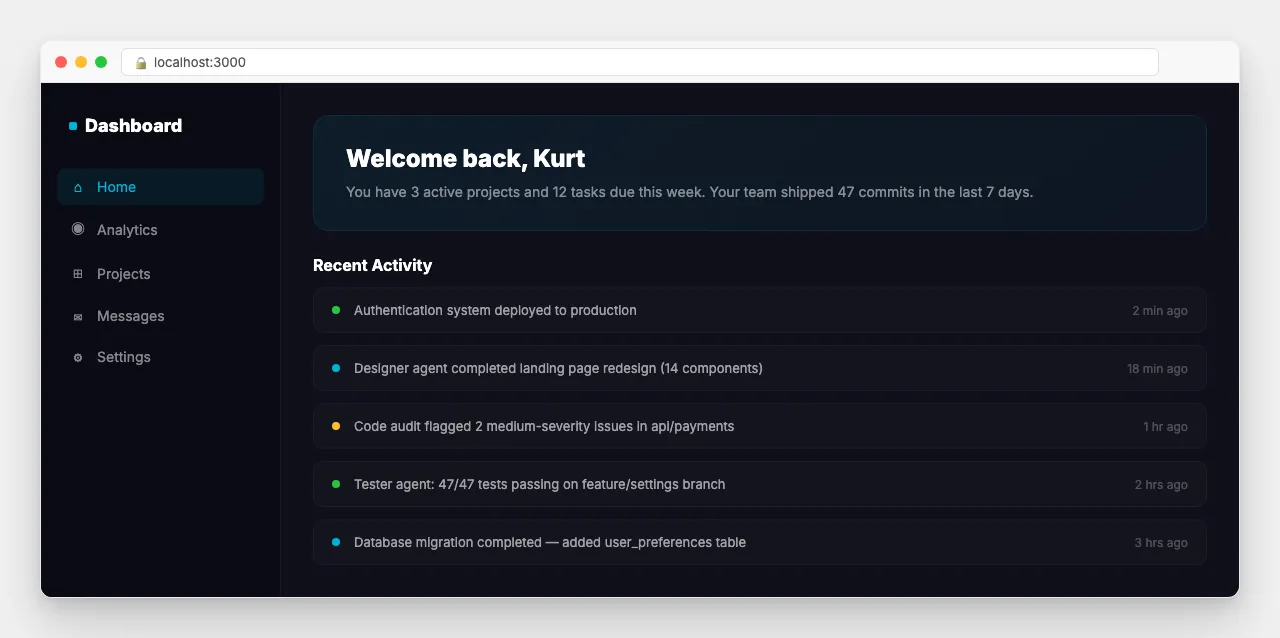
Create a personal dashboard app with Next.js, TypeScript,
Tailwind, and shadcn/ui. Include:
- A sidebar navigation
- A main content area with a welcome card
- A recent activity feed (mock data is fine)
- Dark mode by default
- Mobile responsive
Deploy-ready for Vercel.
Claude scaffolds the entire project, installs dependencies, creates components, wires up the styling, and leaves you with a working application. The whole process takes five to ten minutes.
Run it:
bun devOpen localhost:3000 and you have a finished dashboard.
From here, iterate. Every conversation builds on the last:
Add a blog section with MDX support.Connect it to a Turso database for the activity feed.Add authentication with Sigma Auth.Set up email notifications with Resend.Claude remembers your project structure, your preferences, and your patterns. Each request builds on everything that came before.
Step 9: Advanced patterns that changed my workflow
Once you are comfortable with Claude Code and bOpen agents, these patterns will multiply your output:
Pattern 1: Parallel agent dispatch
Research competitor landing pages for developer tools,
then design our landing page based on the best patterns
you find. Run a Lighthouse performance audit when done.
Claude sends out a researcher, designer, and optimizer agent simultaneously. Results come back in minutes instead of hours.
Pattern 2: The /prime + /plan workflow
# Start every work session with this:
/prime
# Claude loads: git status, recent commits, branch info,
# project structure, active TODO items

# Then plan your work:
/plan Implement the payment integration with Stripe.
# Claude produces a detailed plan aware of your full project context.
Pattern 3: Bug hunting before merge
# Before merging any feature branch:
/bug-hunt
# Three independent agents (Hunter, Skeptic, Referee) audit
# your changes adversarially. They argue with each other
# about whether issues are real. Only confirmed bugs survive.
Pattern 4: Content creation pipeline
# For articles, social posts, and media:
/generate-image "Hero image for article about AI development"
/humanize        # Strip AI writing patterns
/geo-optimizer   # Optimize for AI search engines (Perplexity, etc.)
What This Means For You
I am not a great developer, and have always been a generalist in any codebase. I am a journalist, a historian, and a content creator, but I am so excited to be able to push my ideas out just by writing a great plan. Claude did not lower the bar. It removed the bar entirely and replaced it with a conversation.
If you are a writer, Claude drafts and edits with you. If you are a business owner, Claude builds your internal tools. If you are a developer, Claude is the senior engineer you always wanted on your team but could not afford. And if you are a development manager, Claude gives every person on your team a fleet of tireless, competent agents who do exactly what they are told.
The people who figure this out now will have an enormous advantage over those who wait. That is not hype. That is the same pattern I have watched play out with Bitcoin, with the internet, with every transformative technology: early adopters build, late adopters buy.
Start here: claude.ai/referral/EkwGoE2TFA
Sign up. Install Claude Code. Install the bOpen plugins. Build something real. You will wonder why you waited.
Be good to each other. And go build something.
Kurt Wuckert Jr. is the Chief Bitcoin Historian and host of a weekly livestream called Kurt's Podcast covering Bitcoin, technology, and the systems that shape the world. Follow him at kurtwuckertjr.com.